Migration to TypeScript - The How.
In my last blog I talked about some of the reasons which inspired our team to move our codebase from JavaScript to TypeScript. In this blog, I am going to discuss a general overview of the execution process.
The Preparation
For me, the task was slightly daunting, for two reasons.
- My TypeScript expertise was not at a level where I could effectively get the job done. I was keen on doing it the right way and avoiding a rewrite a few months or years down the line. Luckily, I paired up with another colleague who had more experience in the language. This helped to bounce ideas of off someone else and not be the sole person checking in changes without a second pair of eyes 👀
- The codebase was a decent size and I wasn’t the most familiar with all the areas as I was the newest member of the team. Like I mentioned in my previous post, the model wasn’t the easiest to grasp and we had to write a declaration file for it! To me, this part was going to give us the most benefit from a developer experience point of view as well as keeping us honest throughout the rest of the code by setting the right contexts.
Before getting started, I had to improve my knowledge of TypeScript. There are tons of material online for this. The book, Effective TypeScript by Dan VanderKam came highly recommended. It was a fairly quick read and it was perfect because it was for folks (like me) that a had basic knowledge of what TypeScript was but wanted to boss up on the language! Also, it’s not continuous read and you can skip to relevant sections that are of interest to you.
Also, there was one thing for sure - we were not the first at doing this migration. Tons of material on the interwebs on this. From cheatsheets to articles to videos. You name it, you got it. While there were some conflicting information sometimes on best practices, I think most of them sent the same message about it being a gradual process and advised on pacing yourself. Also, I quickly came to realize that the migration looked differently for everyone based on the size and nature of their projects and the strict settings they wanted.
I wanted to point out that I experimented with a few tools to hack my way through it. and the results weren’t pleasant. For example, I tried to use this to generate our declaration file (.d.ts) for our model API and it just did not work. I can’t remember where the failures were but in retrospect, it was an audacious attempt. The tool needs some more context to work effectively.
Getting things started
Tooling & Configuration
In JavaScript, like most, we use Babel to transpile all our modern ES6+ code down into versions that the browser could understand. Luckily, Babel supported TypeScript and the only changes we had to do was add the @babel/typescript preset to out .babelrc file.
Also, we added support for .tsx extension to out babel-loader plugin (in Webpack) and in all the other necessary places (like package.json configs) that needed some extension clean up as well
Eslint had to be switched to the TypeScript variant (@typescript-eslint/parser) as well and some changes had to be reflected in our .eslintrc file as well
Oh and obviously we installed the most needed dependency - TypeScript.
Establish some guidelines
To guide us, we established some guidelines right off the bat to make sure we were on the same page. Here are a few of them for the preliminary round.
- Avoid changes to existing code or logic as much as possible. This exercise was mainly to migrate to TypeScript and not a code refactoring exercise. Fight the urge.
- Try to avoid
anyas much as possible - you can think ofanyasTODO. We are trying to type as specific as possible. There’s the saying is that if you have anyanyin your code, you have not fully completed the migration. - Type as specific as you can. Example - if you have a function that accepts a certain set of string constants. Make sure it’s the union of those constants only and not just a
stringtype. For example:
 // Define constants
 const A = "a";
 const B = "b";
 const C = "c";

  // Create custom Type
 export type LabelTypes = typeof A | typeof B | typeof C

 // Enforce that we only accept "a", "b" or "c" and not just any string.
 setLabel(s: LabelTypes) {
     this.label =  value
}- Try to avoid TypeScript run time syntax that is not standard to JavaScript (private fields, enums, etc) This might be slightly controversial. I mean people migrate to TypeScript to take advantage of types like enums So why avoid them? Well, the rational is that some of these run time syntaxes may be supported by JavaScript in the future and there’s a chance that TypeScript may deprecate them to avoid overlapping functionality
The Execution 🚀
First things first, we needed to set the “rules” to govern our type checking. The power of TypeScript’s incremental adoption lies in it’s tsconfig.json configuration file. The several levels of options there allowed us to tweak the strictness of type checking as we made progress - the ultimate goal is to get to a point where could set “strict”: true to enable all strict type-checking options.
Ok, so now it was time to make our files legit TS files - change the extensions! All .js had to be switched to .ts and any React components had to be switched to .tsx (.ts wouldn’t work here). Now the moment of truth - time to run tsc command on our project to type check. This will dictate how much type-errors we had to fix. The result …
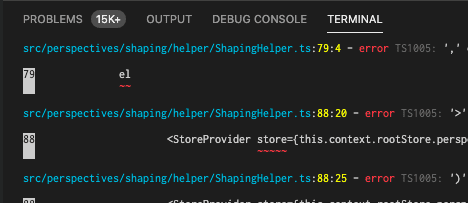
Yikes. 15k+ errors. That’s insane 😱. How were we going to get through this? It was at this point where I would be lying if I said we didn’t re-think if this was feasible at all. But…why not try right? We could have leveraged the allowJs flag to allow for TypeScript files and JavaScript to co-exist and import one another. But we were deep in the waters now with the file renames and we were ready to put on our big boy pants and forge on with strictly TypeScript.
Let the games begin
Declaration files
In addition to TypeScript dependecy, there were a bunch of other @types dependencies that needed to be installed based on what we were using. The @types packages contain type definitions that you can just download and benefit from for packages that may not even be written in TypeScript. DefinitelyTyped is leading the charge in the community-driven effort to type all popular JS libraries. The common ones we downloaded are:
- @types/react
- @types/react-dom
- @types/jest
- @types/webpack-env
Our domain model API was internal to us, so we could not benefit from the gloriousness of DefinitelyTyped. We had to sit down and look at the schema and mimic it. My colleague did a really good job at kicking this off as he knew the codebase well and was able to do some nifty things that helped us get a lot out of TypeScript. I think writing a good declaration file(if you need one) is key to getting the most out of TypeScript.
Starting with core modules
Now that we had the declaration files of our different dependencies (where available) installed, we decided to tackle our core modules next. Think of the core modules as the lowest level in your app tree in which other modules in your code depend on. Common utils is a typical example. We wanted to get them over and done with as once we started typing lower-level code, it was guaranteed to increase the type errors on our “upper-level” modules in our code dependency graph
Don’t forget to have fun with it. Guaranteed, some of TypeScript’s errors will drive you nuts - like banging your head against the wall nuts. The verbosity of some of the errors will do that to you. Whenever I felt that I had reached my limit for the day, I ‘ll take a break and commit with a message like
git commit -a -m "< 2000 errors...let's gooo!"😆
Working off the same branch
We had just one branch that we both worked off of. We figured that since we were just two, it wouldn’t cause too many conflicts. We usually tried to work on “opposite ends” of the code after we got through the core stuff but there were clashes sometimes - mostly in our model declaration file since it was the common place we had to add code to dictate the shape of our model. It was interesting to see how accurate (or lack thereof) we had each typed the same piece of code during conflicts.
Gotchas and Tips
Undefined class members
- Classes in JavaScript don’t need to have their class members declared but those in TypeScript do. If these are not defined, you’ll get an error similar to the one below:
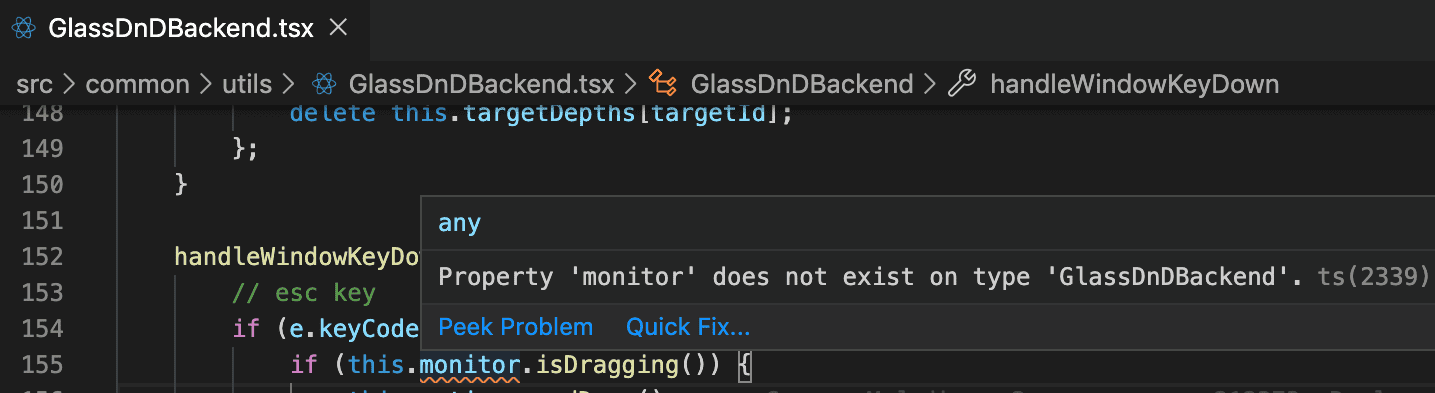
The Quick Fix option from VS Code usually works to add the declarations for the missing members but you should always verify that the right type has been inferred.
Type Assertions
Type Assertions allows you to override its inferred and analyzed view of types in any way you want to. It’s telling the compiler that you know a more specific type than what was inferred.
For example, let’s say you have a base class Bird and subclass Eagle. If you have a method getBird() that returns a Bird but you know for a fact that what you’re getting back is going to be an object of type Eagle you would use type assertion here like so:
getEagle(object: Bird): Eagle | null {
	return getBird(object) as Eagle;
}
I like to describe this as “typing down” as you technically are typing to more granular levels.
Lazy Object Literal Initialization
In JS, we sometimes initialize an empty object literal and then go ahead and assign properties on the go:
let obj = {}
obj. x = 5;
obj.name = "Name";
This is fine in JS, but in TypeScript, you get errors below:
let obj = {}
obj. x = 5; // Error: Property 'bar' does not exist on type '{}'
...
obj.name = "Name";  // Error: Property 'name' does not exist on type '{}'
This is because TypeScript thinks the type of obj is an empty object with no properties so it rightfully complains when you try to add a property to it. There are a few ways to resolve this. The ideal way is to simply assign the properties to the object (if known) on initialization.
let obj = {
    x: 5,
    name: "Name",
}
Another option will be to create an interface that will define the shape of the object. This will be useful in cases where the type of object is going to be referred to in a few other places in the code and you can hence benefit from the auto-documentation of the interface as a well safe assignment. It will look like:
interface MyObj {
    x: number
    name: string
}

let obj = {} as MyObj
obj.x = 44 // OK
obj.name = false // Error
The Finale - Deliver 🎌
Finally, the job had been done. We made it through 🍻. Happy tears all around. We never thought the day will come but here we were. We were ready to hit that “Squash & Merge” button to merge this beast of commits! But things don’t always go as planned, right? There was a problem.
The problem: Remember when I said we worked off the same branch? Yeah…we made too many changes over time in that single branch and we ran into a major issue. Git was recognizing the renamed files as new files and not renamed ones! Why is that important? History! We wanted to preserve the Git history on all these files.
There are hard-coded limits used in Git’s algorithm to determine the number of changes in a file before it just flags them as new files. To get around this, we had to go back, create a new branch with only the file extension rename changes, commit that (with no additional changes) and then bring in all the other changes by simply replacing all the files with the one from our previous (original) branch.
Whew 😅! That was an interesting ride. But it was done - well the first major phase. The goal is to eventually get to the strict mode but for now, we can take a breather, do some (real) work on some features (let’s not get the product managers mad) and come back to it…Maybe? 😉