What’s CORS? Cross-Origin Resource Sharing. That makes a lot of sense right? No? It doesn’t mean much to me either. But let’s use a hypothetical to drive home the point of what it is; or rather, what it allows you to do.
So you discover this awesome remote API, and want to build a sleek frontend around it. To get a feel of that API you probably will reach out for Postman or if you are GUI-averse, the good-ol’ CURL CLI alternative.
Your fire off a few GET command and probably get to see some cute pics of dogs or whatever data your API responds with. Great! The API works! Now, let’s build something more elaborate with this API. A web app perhaps?
You quickly start an app and soon enough you are making the same API call you made earlier on but this time there’s a difference. It no longer works! You are using the same params - tokens, credentials etc. Time to put on our debugging cap. Let’s check our developer console . Sure enough there’s a warning like the one below
Ladies and gentlemen, congrats, you’ve hit the dreaded error incorrectly referred to as the “CORS-error”. It’s a security mechanism build into the BROWSER to allow access to the API. Without it, the browser will have just denied it. Btw, noticed I said the browser - that’s why your command likely succeded in Postman or using the curl command.
How does it work?
CORS works in a sneaky way. Before you actually fire off your “non-simple” request (basically any message protocol with JSON/ cookie-related), an initial request (OPTION aka preflight request) is sent before hand to check to see if you are on the API’s “good list” aka the “Access-Control-Allow-Origin” response header. The param for this header could be * which means it’s a free for all and all domains can connect to it or it will actually list the select few domains that made it into their good list. Once the green-light is given (a return status of 200), your original request is then (safely) fired. See image below
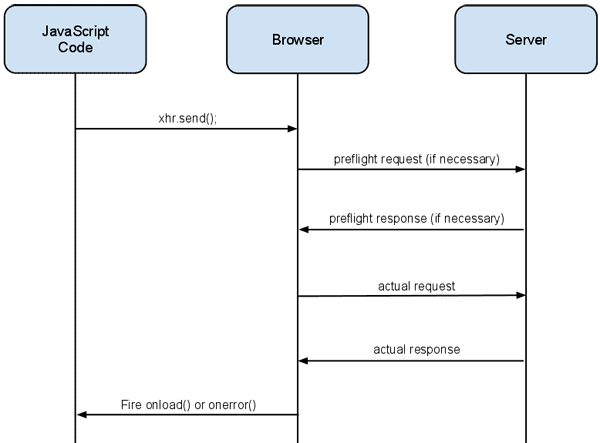 Image credit: https://blog.mozilla.org/
The “Fix”
So how do I fix the error then now that I know why it failed?
Firstly, If it’s a simple public API, most likely it accepts all domains and we wouldn’t be talking about CORS. But it’s something a bit more “serious”, the correct way will be to make some changes on the API (server) side. Probably support the Access-Control-Allow-Origin header and put your domain on their good list But what if you don’t have time for that can’t reach the API dev or you just want to quickly want to unblock yourself? Use a proxy! This piece of middleware will do the job of making the call and intercept the response and add the header to it and your browser will be happy again. A common proxy I’ve seen used is ’https://cors-anywhere.herokuapp.com/’. So it will work something like this ’https://cors-anywhere.herokuapp.com/https://domain.com/api/cats’
Great so now you know what CORS is. It’s simply a mechanism built to give you access to some backend resource over the browser. It’s not necessarily the bad guy here. It’s the saviour with a shiny armour when you are in distress